How Learning on Industry-Standard Mixers Improves Every Recording You Make
Creating exceptional audio is about much more than pressing the record button. Every professional production begins with a strong understanding of the equipment that shapes the final result, and one of the most valuable tools in any studio is the podcast mixer. While software continues to evolve, the skills developed by working with professional hardware remain relevant across podcasts, video projects, livestreams, interviews, and multimedia productions. Learning these techniques gives creators confidence that extends far beyond a single platform or project.
At Masterly Studios, we believe that investing in technical mastery is one of the smartest decisions a creator can make. The experience of working with industry-standard equipment teaches practical skills that improve every stage of the creative process. Whether you're producing your first show or expanding an established brand, understanding how a professional mixer works allows you to produce cleaner recordings, streamline editing, and deliver a better experience for your audience.
Today's creators have access to countless tools, from a simple online audio editor to advanced studio systems. While these solutions offer convenience, learning the principles behind professional recording equipment helps you make better decisions regardless of which software, device, or platform you use. The knowledge transfers naturally between projects, giving you greater flexibility as your creative goals continue to grow.
Why Professional Mixers Build Skills That Last
Many beginners purchase equipment based only on current needs, but experienced podcasters think about long-term growth. Learning to operate a professional podcast mixer develops habits that remain useful whether you're producing weekly podcasts, recording interviews, creating educational content, or working on video productions.
Instead of relying entirely on automatic settings, creators begin to understand signal flow, microphone placement, gain structure, and overall audio management. These concepts apply to virtually every recording environment, making them valuable no matter which brand of equipment you eventually choose.
Professional hardware also encourages a more disciplined workflow. Rather than correcting every issue during post production, creators learn to capture clean recordings from the beginning, saving valuable editing time later.
Hardware Knowledge Transfers Across Every Project
The techniques learned on one professional mixer often translate easily to another. While layouts and menus may vary, the underlying principles remain consistent.
You'll develop confidence in areas such as:
- Managing multiple channel settings
- Monitoring audio in real time
- Setting proper gain control
- Learning when to adjust volume
- Routing other audio sources
- Recording multiple speakers efficiently
These transferable skills make it easier to adapt as new technology enters the market.
Understanding the Role of a Podcast Mixer
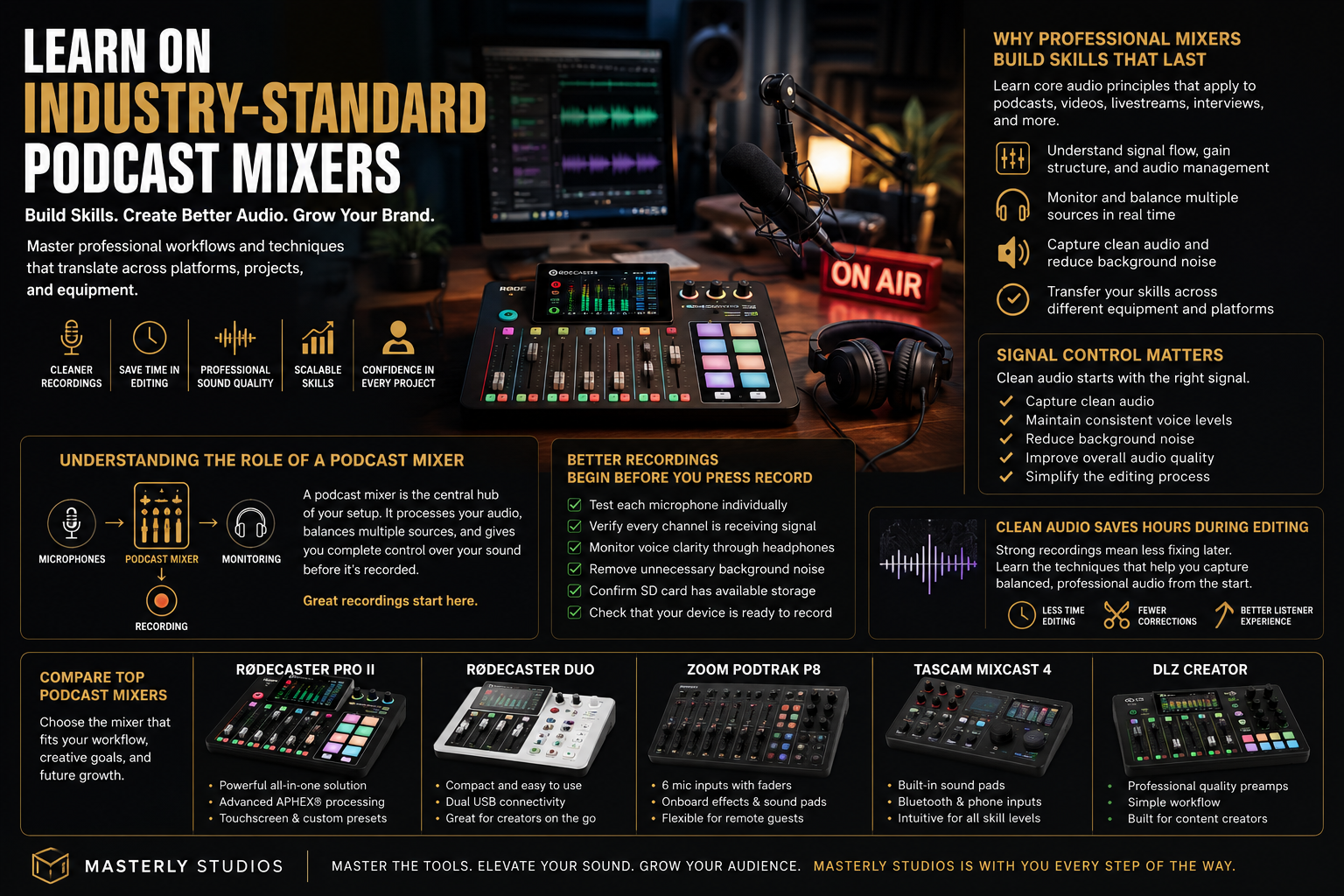
A podcast mixer serves as the central hub for your recording setup. It receives signals from your microphones, processes the incoming audio, and gives you direct control over how each source sounds before the recording is saved.
Unlike basic recording solutions, professional mixers allow creators to monitor levels, balance multiple speakers, and create polished productions while recording instead of depending entirely on editing afterward. This approach improves consistency and helps maintain excellent audio quality throughout every session.
Many modern systems combine hardware and software, giving creators the flexibility to record, monitor, and manage projects more efficiently. Whether you're producing solo episodes or interviewing remote guests, a capable podcast mixer becomes the foundation of your production workflow.
Why Signal Control Matters
Professional creators understand that every recording begins with a clean signal. Once distortion or unwanted background noise enters a recording, removing it completely becomes much more difficult.
Learning proper signal management allows you to:
- Capture clean audio
- Reduce excessive background noise
- Maintain consistent voice levels
- Improve overall quality
- Simplify the editing process
These improvements benefit every type of production, from podcasts to webinars and corporate presentations.
Learning on Industry-Standard Equipment Creates Better Habits
Professional studios rely on proven equipment because consistency matters. Learning with respected systems such as the RØDECaster Pro II, RØDECaster Duo, Zoom PodTrak, TASCAM Mixcast, and DLZ Creator exposes creators to workflows that mirror real production environments.
Each podcast mixer offers different strengths, but all encourage creators to think carefully about routing, monitoring, recording quality, and production efficiency. Instead of becoming dependent on one specific interface, you begin understanding the broader principles behind professional recording.
The goal is not memorizing buttons but learning how every adjustment influences the final sound.
Comparing Professional Podcast Mixers
Many creators researching the best podcast mixers compare features before making a purchase. While every project has different requirements, several professional models consistently appear among the best podcast production tools because they balance ease of use with advanced capabilities.
Popular choices often include:
- RØDECaster Pro II
- RØDECaster Duo
- Zoom PodTrak
- TASCAM Mixcast
- DLZ Creator
Rather than focusing only on specifications, evaluate how each mixer supports your workflow, future growth, and production goals.
Better Recordings Begin Before You Press Record
Many new creators believe editing will solve every problem. In reality, excellent productions begin before recording even starts. Careful preparation allows you to record stronger source material while minimizing distractions that slow the editing process.
Simple practices such as testing microphones, checking channel levels, monitoring headphone output, and identifying potential background noise can dramatically improve the finished project. These habits become second nature when working regularly with a professional podcast mixer.
Preparing Your Recording Environment
Every recording session should begin with a quick equipment review to protect overall audio fidelity.
Before you start, remember to:
- Test each microphone individually.
- Verify every channel is receiving signal.
- Monitor voice clarity through headphones.
- Remove unnecessary background noise whenever possible.
- Confirm your SD card has available storage.
- Check that your device is ready to record.
Building this routine helps creators capture reliable recordings that require less corrective work later.
Clean Audio Saves Hours During Editing
One of the greatest benefits of professional recording techniques is reducing the amount of time spent fixing mistakes afterward. Strong recordings allow editors to focus on enhancing the listening experience instead of repairing technical problems.
Learning how to remove background noise, monitor levels, and capture balanced conversations creates projects that require less aggressive noise reduction and fewer corrective edits. Whether you're producing podcasts, interviews, educational videos, or branded content, starting with clean audio always leads to better results.
At Masterly Studios, we encourage creators to think beyond individual recordings. Every session is an opportunity to build lasting skills that improve future productions, regardless of the equipment, software, or platform you choose next.
Choosing the Right Audio Editor for Professional Results
Recording is only one part of the creative process. After every session, creators need a dependable audio editor that allows them to refine their work without sacrificing efficiency. Whether you use professional studio software or a simple online audio editor, learning the fundamentals of editing makes every project stronger.
A quality audio editor gives you the ability to trim mistakes, balance levels, organize tracks, and prepare content for publication. Many creators begin with an online audio editor because it works directly in a browser, making it easy to access projects from different locations. As your skills grow, those same editing principles transfer naturally to more advanced production software.
Editing Skills Matter More Than the Software
Every audio editor has a different layout, but the creative decisions remain the same. Learning how to edit audio effectively is far more valuable than memorizing one program's interface. Once you understand pacing, transitions, and timing, you can confidently work in nearly any editing environment.
Popular tools such as Audacity provide an excellent introduction for beginners, while more advanced software offers additional features for larger productions. No matter which application you choose, consistent practice helps you edit more efficiently and produce higher-quality content.
Understanding Audio Interfaces and Signal Flow
A professional audio interface acts as the bridge between your microphones, your computer, and your recording software. It converts analog sound into digital audio, allowing you to capture clean recordings with minimal interference.
Learning how an audio interface works improves every recording session because you begin to understand signal flow instead of relying on trial and error. This knowledge also helps when integrating a professional podcast mixer into your production setup.
Why Inputs and Outputs Matter
Many creators underestimate the importance of connection options until their productions begin to grow. A quality podcast mixer with multiple XLR inputs, dedicated mic inputs, and reliable headphone outputs gives you room to expand without replacing your equipment.
Some creators specifically choose systems with four XLR inputs or even four mic inputs because they regularly host interviews with several guests. Having enough connections available makes recording smoother while providing greater flexibility for future projects.
Recording in the Right File Formats
Choosing the proper recording formats is just as important as selecting the right equipment. Professional creators often record in WAV because it preserves excellent audio quality during editing. Once the project is complete, additional audio file formats can be created to match publishing requirements.
For creators who need a small file size, compression techniques help reduce storage needs while maintaining good playback quality. Understanding when to prioritize quality over convenience is an important part of developing professional recording habits.
Managing Audio Files Efficiently
Organizing your audio files makes editing faster and reduces the risk of losing valuable recordings. Create a consistent folder structure for every project, label recordings clearly, and back up important sessions before beginning major edits.
Many editing applications also allow you to drop audio files directly into the timeline, making it easier to arrange interviews, music, and narration. Whether you're producing a short podcast episode or a full-length documentary, organized audio files save time throughout the production process.
Combining Audio and Video Successfully
Modern creators often produce both podcasts and video content for multiple platforms. Learning professional recording techniques allows you to create synchronized productions that work equally well for audio-only listeners and video audiences.
A polished production may include interviews, screen recordings, presentations, or even music videos. Strong recording practices ensure that every voice remains clear regardless of how the final project is presented.
Enhancing Productions with Music and Sound
Music can dramatically improve pacing and emotional impact when used thoughtfully. Many creators choose to add music during introductions, transitions, or closing segments while also incorporating subtle sound effects to reinforce important moments.
The goal is to support the story rather than overwhelm it. Balanced music, carefully selected sound effects, and clean narration help create productions that feel professional without distracting from the message.
Modern Podcast Mixers Support Growing Creators
Today's best podcast mixers offer far more than simple recording controls. Many combine hardware recording, editing support, sound processing, and publishing tools into one streamlined workflow.
Some creators appreciate the RØDECaster Pro II because of its advanced routing options and built in effects, while others prefer the compact RØDECaster Duo, versatile Zoom PodTrak, reliable TASCAM Mixcast, or intuitive DLZ Creator. Comparing these best podcast mixers helps creators choose a system that matches both current needs and future ambitions.
Features That Make a Difference
When evaluating the best podcast equipment, focus on practical workflow improvements rather than long specification lists. Important features often include:
- Multiple XLR inputs
- Easy gain control
- Reliable headphone outputs
- Flexible channel routing
- Support for multiple microphones
- Convenient SD card recording
- Simple control over monitoring
- Options to fine tune every recording
These capabilities help creators produce consistent, high-quality recordings while preparing for more advanced productions.
From Recording to Publishing With Confidence
Learning professional recording techniques improves every stage of the creative journey. You'll spend less time correcting mistakes, produce cleaner audio, and create projects that require less intensive post production.
Whether you're using a professional podcast mixer, an online audio editor, or industry-standard editing software, the transferable skills you develop remain valuable across future projects. At Masterly Studios, we help creators build confidence through practical experience, enabling them to produce podcasts, videos, and multimedia content that reflects professional standards from the very first recording
Creating Professional Recordings Anywhere
One of the greatest advantages of modern production equipment is flexibility. Today's creators are no longer limited to a traditional studio because many professional systems are portable enough to support recording in offices, conference rooms, classrooms, or remote locations. Whether you're creating interviews, educational content, or branded podcasts, a dependable podcast mixer helps maintain consistent quality regardless of where you choose to record.
Many professional creators also rely on mobile devices to monitor sessions, manage projects, or review recordings while traveling. Combined with reliable recording hardware, these tools allow you to maintain an efficient workflow without sacrificing production standards.
Recording Remote Conversations With Confidence
Interviewing remote guests has become a normal part of modern podcast production. A professional podcast mixer paired with a dependable audio interface allows creators to maintain clear communication while capturing every voice with impressive clarity.
Many systems also support multiple recording methods, making it easier to save sessions directly to an SD card while simultaneously recording to a computer for added security. This level of flexibility helps prevent lost recordings and gives creators greater confidence during important interviews.
Free Tools Can Build Professional Skills
Expensive software is not always necessary when you're learning the fundamentals of production. Many creators begin with free editing programs before investing in advanced solutions, allowing them to practice recording, editing, and publishing without significant upfront costs.
A reliable online audio editor can also be a valuable resource for quick adjustments, especially when working from a browser or another device away from your primary studio. Learning to edit audio effectively with free tools builds habits that transfer easily to professional production environments.
Practice Builds Confidence
The best way to improve is through consistent practice. Every project gives you another opportunity to edit, organize audio files, refine voice recording, and experiment with different workflows. Over time, you'll become more comfortable using an audio editor, balancing channel levels, and learning how to remove background noise before it affects the final production.
Professional creators understand that experience matters just as much as equipment. Every recording contributes to stronger technical skills and greater creative confidence.
Publishing High-Quality Content
Creating exceptional content does not end after editing. Preparing your project for distribution requires selecting appropriate formats, exporting optimized audio files, and making sure each video file meets the technical requirements of your chosen platform.
Whether you're planning to upload a podcast, educational presentation, webinar, or promotional video, maintaining consistent audio quality helps create a better experience for every listener. Many creators also produce versions with a small file size for faster downloads while preserving the original WAV recording for archival purposes.
Building an Efficient Publishing Workflow
Successful creators develop repeatable systems that simplify every project from recording through final delivery. A dependable workflow often includes:
- Organizing audio files before editing.
- Using an audio editor to edit and polish every recording.
- Applying noise reduction to improve clean audio when necessary.
- Exporting multiple formats for different platforms.
- Testing each upload before publication.
- Backing up projects to an SD card or secure storage.
This organized approach saves time while improving consistency across future productions.
Choosing the Right Mixer for Long-Term Success
The best podcast equipment is not always the most expensive option. Instead, the right podcast mixer is the one that supports your current workflow while allowing room to grow. As your production expands, you'll appreciate flexible features, dependable control, and hardware that adapts to new creative opportunities.
When comparing the best podcast mixers, think beyond today's project. Consider how often you'll record, whether you'll use multiple microphones, and how easily the system integrates with your existing software. Some creators also compare other mixers before making a decision, ensuring they choose equipment that aligns with both their production style and future goals.
Looking Beyond Specifications
Specifications are important, but practical experience often reveals which tools truly improve your workflow. A good USB microphone, paired with a professional podcast mixer, can produce excellent results for solo creators, while larger productions may benefit from advanced routing, additional XLR inputs, and more comprehensive control over each channel.
Many modern mixers also provide an all in one solution, combining recording, monitoring, processing, and publishing support within a single system. This streamlined approach helps creators spend less time managing equipment and more time creating meaningful content.
Key Features That Improve Sound Quality in Every Recording
When evaluating a professional podcast mixer, it's important to look beyond the specifications and focus on the key features that genuinely improve your workflow. Excellent sound quality starts with reliable preamps, flexible routing options, intuitive controls, and dependable monitoring that allow creators to capture clean, consistent recordings from the beginning. Devices such as the RØDECaster Pro II are highly recommended for creators who need advanced production capabilities, while the compact RØDECaster Duo offers many of the same professional tools in a streamlined format for smaller studios. By choosing equipment with features that support both your current projects and future growth, you'll develop skills that translate across podcasts, video productions, interviews, and other professional recording environments.
Master Every Recording With the Right Skills
Technology will continue to evolve, but strong recording fundamentals never go out of style. Learning to work with a professional mixer, understanding how to edit efficiently, and developing confidence with industry-standard workflows prepares you for virtually any creative opportunity. Those transferable skills improve not only your current podcasts but also future video, music production, educational, and commercial projects.
At Masterly Studios, we believe every creator deserves the opportunity to build lasting skills that extend far beyond a single platform or production. Whether you're learning your first podcast mixer, comparing the best podcast mixers, refining your recording process, or looking to improve your overall production workflow, we're here to help you succeed.
If you're ready to elevate your recordings through professional guidance and hands-on experience, contact Masterly Studios today at (404) 726-7261 to book your free consultation. We proudly work with creators, businesses, and organizations throughout the country, helping clients develop the confidence and expertise to produce outstanding podcasts, videos, and audio content with professional results that last well beyond a single project.